

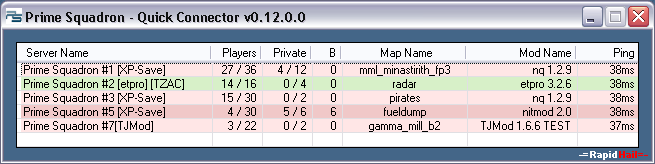
Info:
- ver. 0.13.1.1 (2021-01-24)
- Works with Enemy Territory, ET Legacy and Enemy Territory: Quake Wars
- To use ET Legacy instead of Enemy Territory, change in settings "Set ET Legacy as default"
- From submenu you can add custom ET servers to the list
- Autocheck for update (Options: default ON)
- Autoclose after game start (Options: default OFF)
- Application remove Top Most flag from Enemy territory window.
- Enemy Territory and ET Legacy Minimizer implemented. Hot Key: 'Ctrl+M' (Options: default ON)
(ET Minimizer is available for Windows users only) - Sorting table by clicking on column names
- You can add parameters to each server to run game with them
- You can add password for private slots connection
- Working in systam tray
- Forced to run as one instance
- .NET Framework 4.6.1 is required to work
- Works under Linux and Mac with Mono
- Any suggestions or problems? Post them >> HERE <<
- Name of the server
- Number of players and available slots
- Number of private slots occupied and available
- Number of bots
- Name of the actual map
- Name and version of server mod
- Ping to server
- Colored row status:
- ■■■■ PunkBuster/TZAC ON
- ■■■■ PunkBuster/TZAC OFF
- ■■■■ Connecting to server
- ■■■■ Connection error
- To start a game:
- Right mouse click on selected server, then click "Connect"
- Double click on selected server
- Select server and press 'ENTER' key
- To start a game, when server didn't returned own status:
- Right mouse click on selected server, then click "Force Connect"
- Double click on selected server, then click "Yes" button
- Select server and press 'ENTER' key, then click "Yes" button
- To minimize Enemy Territory window use hot key 'Ctrl+M'
- To minimize ET Legacy check the settings for "Set ET Legacy as default"
- Right mouse click on list and then click "Private Password" to add or edit one
- Right mouse click on list and then click "Connect without password" to connect on public slots
- Right mouse click on list and then click "Parameters" to parametrize servers
- Right mouse click on list and then click "Settings" to change them